
I have been running Linux on my HP Pavilion Plus Laptop 14-eh0xxx since 2022, and inevitably, as with most Linux installations, some things will not work perfectly with your hardware.
Initially there were a few rough edges, like the fingerprint scanner and the mute LED on the function key. The mute button itself worked, but the small orange LED that should indicate the muted state did not. My knowledge of how to fix these kinds of issues was very limited back then, so I just decided to live with it.
Over the years, the fingerprint scanner started working, thanks to the maintainer who worked on it. The only issue remaining was the mute LED, and with nothing better to do with my time, I decided to fix it myself.
Also fair warning: The title is a bit clickbaity, the contribution is literally one line.
The main issue
So the F5 key on my laptop is also the mute button. It has an orange LED that lights up based on the mute state. Muted -> orange light.
But for some reason, on my Linux machine, the F5 key was muting and unmuting audio as expected, while the LED would never turn on regardless of the audio state.
Beginning the search
The first obvious thing to do while debugging is to do a web search. Since I am running Arch Linux, I preferred sources that were also using Arch Linux. But the following guide should be applicable to other distros as well. That led me to this forum page: Enabling Mute Fn Key LED on HP Laptop , where other people with HP laptops had a similar issue: the mute LED was not working.
This forum post had just enough to get started.
LEDs in the Linux Kernel
Many kernel-managed devices are exposed through files under /dev, /proc, or /sys. LEDs specifically are exposed through the LED class at /sys/class/leds/.
Checking /sys/class/leds/ shows the hardware LEDs that the kernel knows about on your system. This is an abstraction that lets any driver register a logical LED, regardless of what physically drives it. It could be a GPIO pin, a USB device, a PWM controller, or, in my case, a bit in an audio codec’s register. Any LED registered here gets:
- A sysfs entry at
/sys/class/leds/<name>/brightness(write 0/1 to turn it off/on from userspace) - A trigger attribute: a named event source that drives the LED automatically.
audio-muteis a built-in trigger that fires whenever the kernel’s HDA layer reports a mute state change on the associated codec.
When the driver registers the LED with the audio-mute trigger, the LED subsystem takes full ownership. Now I never need to write to brightness myself, because the kernel does it every time the mute state flips.
Since my mute LED was not working, my system did not have an hda::mute LED device under /sys/class/leds/. I only had entries like input20::capslock and phy0-led.
For the mute LED to work as expected, the kernel needs to know that this LED exists, how to control it, and that it should be connected to the audio mute state. Let’s get started on that.
Step 1: Brute Forcing the LED Values
On the forum post mentioned above, I came across this script, which tests possible values that may toggle the state of the LED. It used hda-verb which is a tool from the alsa-tools package that lets you send raw HDA commands to a codec from userspace.
#!/bin/bash

read -p "What's your sound card? Format /dev/snd/hwCxDx: " card

echo "Testing GPIO pins, polarity 0"
for i in 0x01 0x02 0x04 0x08 0x10 0x20 0x40;
do
  sudo hda-verb "$card" 0x01 0x716 $i
  sudo hda-verb "$card" 0x01 0x717 $i
  sudo hda-verb "$card" 0x01 0x715 $i
  sleep 0.2
done
echo "Testing GPIO pins, polarity 1"
for i in 0x01 0x02 0x04 0x08 0x10 0x20 0x40;
do
  sudo hda-verb "$card" 0x01 0x716 $i
  sudo hda-verb "$card" 0x01 0x717 $i
  sudo hda-verb "$card" 0x01 0x715 0x00
  sleep 0.2
done
echo "Testing COEF and INDEX"
start=0x1
end=0xff
for (( i=$start; i <=$end; ++i));
do
  for j in 0x1 0x2 0x4 0x8 0x10 0x20 0x40 0x80 0x100 0x200 0x400 0x800 0x1000 0x2000 0x4000 0x8000;
  do
    sudo hda-verb "$card" 0x20 0x500 $i
    sudo hda-verb "$card" 0x20 0x400 $j
    sleep 0.2
  done
done
This is a very simple bash script with three for loops. The most important command here is hda-verb.
What the hell is HDA?
HDA (High Definition Audio) is an Intel specification from 2004. It defines a controller (the PCH chip, mine: 8086:51c8) and one or more codecs connected to it over a dedicated serial link. In my laptop:
$ lspci -nn | grep -i audio
00:1f.3 Multimedia audio controller [0401]: Intel Corporation Alder Lake PCH-P High Definition Audio Controller [8086:51c8] (rev 01)
You can read more about HDA in Intel’s High Definition Audio Specification .
This means that the laptop motherboard has an Intel PCH (Platform Controller Hub). You can think of it as the “hub” chip that manages everything that is not the CPU itself: USB, storage, audio, etc.
It has a small dedicated piece of silicon inside it specifically for audio. That piece is identified as 8086:51c8 (8086 = Intel’s manufacturer ID, 51c8 = this specific audio controller model). But that Intel chip cannot produce sound on its own. It is just a controller, and it manages data flow and communication.
The actual audio work (converting digital signals to analog, amplifying the headphone output, routing signals to the right jacks) is done by a completely separate chip: the Realtek ALC245. We can check that with:
$ cat /proc/asound/card0/codec#0 | head -5
Codec: Realtek ALC245
Address: 0
AFG Function Id: 0x1 (unsol 1)
Vendor Id: 0x10ec0245
Subsystem Id: 0x103c8a36
So the audio pipeline is: CPU → Intel PCH (controller) → Realtek ALC245 (codec) → speakers/headphones/LED
The Vendor Id tells us that this is a Realtek ALC245 codec. The Subsystem ID is also important. 0x103c is HP’s vendor ID, and 0x8a36 identifies this specific HP board/model combination. This value becomes the key to the final kernel patch later.
Communication between controller and codec
The Intel controller and the Realtek codec are physically connected on the motherboard by a small dedicated serial bus called the HDA link.
They communicate using 32-bit commands called verbs. The controller sends a verb, the codec executes it and optionally sends a response back. That’s the communication protocol: verb → response pairs over the physical connection.
You can think of it like sending text commands to a microcontroller over a serial port. hda-verb is literally a tool that lets you type those commands manually:
$ sudo hda-verb /dev/snd/hwC0D0 0x20 0x500 0x0b
nid = 0x20, verb = 0x500, param = 0xb
value = 0x0
Inside the Codec: Nodes
The ALC245 is a collection of small functional blocks, each doing a different job. The HDA spec calls these nodes, or widgets and each one has a number called its Node ID (NID). I wanted to confirm that node 0x20 existed and that it was marked as a Vendor Defined Widget, because vendor nodes are where Realtek hides private controls like the LED.
To dump the full node map of the codec:
$ cat /proc/asound/card0/codec#0 | grep "Node\|wcaps"
Node 0x02 [Audio Output] wcaps 0x41d: Stereo Amp-Out
Node 0x03 [Audio Output] wcaps 0x41d: Stereo Amp-Out
Node 0x04 [Vendor Defined Widget] wcaps 0xf00000: Mono
Node 0x05 [Vendor Defined Widget] wcaps 0xf00000: Mono
Node 0x06 [Audio Output] wcaps 0x411: Stereo
Node 0x07 [Audio Input] wcaps 0x10051b: Stereo Amp-In
Node 0x08 [Audio Input] wcaps 0x10051b: Stereo Amp-In
Node 0x09 [Audio Input] wcaps 0x10051b: Stereo Amp-In
Node 0x0a [Audio Input] wcaps 0x10051b: Stereo Amp-In
Node 0x0b [Vendor Defined Widget] wcaps 0xf00000: Mono
Node 0x0c [Vendor Defined Widget] wcaps 0xf00000: Mono
Node 0x0d [Vendor Defined Widget] wcaps 0xf00000: Mono
Node 0x0e [Vendor Defined Widget] wcaps 0xf00000: Mono
Node 0x0f [Vendor Defined Widget] wcaps 0xf00000: Mono
Node 0x10 [Vendor Defined Widget] wcaps 0xf00000: Mono
Node 0x11 [Vendor Defined Widget] wcaps 0xf00000: Mono
Node 0x12 [Pin Complex] wcaps 0x40040b: Stereo Amp-In
Node 0x13 [Pin Complex] wcaps 0x40040b: Stereo Amp-In
Node 0x14 [Pin Complex] wcaps 0x40058d: Stereo Amp-Out
Node 0x15 [Vendor Defined Widget] wcaps 0xf00000: Mono
Node 0x16 [Vendor Defined Widget] wcaps 0xf00000: Mono
Node 0x17 [Pin Complex] wcaps 0x40058d: Stereo Amp-Out
Node 0x18 [Pin Complex] wcaps 0x40048b: Stereo Amp-In
Node 0x19 [Pin Complex] wcaps 0x40048b: Stereo Amp-In
Node 0x1a [Pin Complex] wcaps 0x40048b: Stereo Amp-In
Node 0x1b [Pin Complex] wcaps 0x40058f: Stereo Amp-In Amp-Out
Node 0x1c [Vendor Defined Widget] wcaps 0xf00000: Mono
Node 0x1d [Pin Complex] wcaps 0x400400: Mono
Node 0x1e [Pin Complex] wcaps 0x400501: Stereo
Node 0x1f [Vendor Defined Widget] wcaps 0xf00000: Mono
Node 0x20 [Vendor Defined Widget] wcaps 0xf00040: Mono
Node 0x21 [Pin Complex] wcaps 0x40058d: Stereo Amp-Out
Node 0x22 [Audio Mixer] wcaps 0x20010b: Stereo Amp-In
Node 0x23 [Audio Mixer] wcaps 0x20010b: Stereo Amp-In
Node 0x24 [Audio Selector] wcaps 0x300101: Stereo
Node 0x25 [Audio Selector] wcaps 0x300101: Stereo
Some examples of what nodes do:
- NID 0x01: the root node. Called the Audio Function Group. Every codec has exactly one. It’s the entry point; you talk to it to reset the codec or get global info.
- NID 0x02, 0x03: DAC nodes (Digital to Analog Converter). They take the digital audio data from the controller and convert it into an analog signal.
- NID 0x12, 0x13: Pin complex nodes. These represent physical inputs or outputs on the laptop, like the headphone jack or internal speakers. Each pin node is wired to something on the board.
- NID 0x20: this one is special. It shows up as a vendor-defined widget, which means the HDA spec allows it to exist, but does not define what it actually does internally.
Now that we have a basic understanding of the chips and codecs, let’s analyse what the brute force script actually does.
Step 2: Analysing the Brute Force Script
The script first asks for the hardware device node of your sound card. In my case it was /dev/snd/hwC0D0, which means card 0 (C0), codec 0 (D0).
The script works in two phases. The first two for loops are Phase 1, GPIO registers. The last loop is Phase 2, COEF registers.
The script tests each candidate bit/value for 0.2 seconds, and I had to hover my fingers above Ctrl-C to stop the script the instant my LED turned on.
Phase-1: GPIO Registers
(verbs 0x715, 0x716, 0x717)
These are standard HDA verbs defined in the Intel spec for controlling physical GPIO pins directly on the codec. The script cycled through the enable mask (0x716), direction (0x717), and data (0x715) registers for each possible GPIO bit.
On some HP models this is exactly how the LED works. On my system it had no effect, which means the LED is not wired to a standard HDA GPIO. It is behind the Realtek vendor circuitry instead.
Phase-2: COEF Registers
(verbs 0x500 and 0x400)
This swept every COEF index (0x01 through 0xFF) and, for each index, tried every single bit position. The verb 0x500 (SET_COEF_INDEX) moves the codec’s internal register pointer to a specific index. The verb 0x400 (SET_PROC_COEF) writes a value into whichever register the pointer is currently on.
These two verbs always have to be sent as a pair: index first, then write. The codec has one read/write port shared across all COEF registers, and SET_COEF_INDEX is what steers that port to the register we want.
When it hit COEF index 0x0b and wrote 0x08 (bit 3), the LED turned on. That tells me that inside the ALC245’s vendor logic, COEF register 11 has at least one bit that’s wired into the LED driver circuit. The register is likely a general-purpose control register, and bit 3 is mapped in Realtek’s internal gate array to whatever transistor drives the LED.
Step 3: Putting the Values to Work
As I mentioned above, NID 0x20 is a Realtek vendor-defined node. The HDA spec allows vendors to expose private widgets like this, but the behavior of this node is Realtek-specific and is not documented in any public Realtek datasheet.
Inside it is a bank of coefficient registers (COEFs): 256 numbered slots (0x00 through 0xFF), each holding a 16-bit value. What the kernel community has built up over years is a table of empirically discovered mappings: “for codec X with subsystem Y, COEF index Z bit W controls feature V.”
The brute-force process is exactly how many entries in the kernel’s audio driver mute LED table were originally discovered and mapped.
These registers control all kinds of vendor-specific behavior that Realtek does not expose through standard HDA mechanisms: internal equalizer settings, noise cancellation, analog circuit biasing, GPIO pin routing, and most importantly what we need right now: LED control.
The way we access them is always a two-step process, because there’s only one read/write port into the whole register bank:
- Step 1: point the cursor at the register you want (verb
0x500=SET_COEF_INDEX):
sudo hda-verb /dev/snd/hwC0D0 0x20 0x500 0x0b
# "on node 0x20, set the COEF cursor to index 11 (0x0b)"
- Step 2: write a value into it (verb
0x400=SET_PROC_COEF):
sudo hda-verb /dev/snd/hwC0D0 0x20 0x400 0x08
# "on node 0x20, write 0x08 into whatever index the cursor is pointing at"
Or read it back (verb 0x900 = GET_PROC_COEF):
sudo hda-verb /dev/snd/hwC0D0 0x20 0x500 0x0b  # set cursor first
sudo hda-verb /dev/snd/hwC0D0 0x20 0x900 0x00  # read it back
# value = 0x0  (or whatever is currently stored)
Always cursor first, then read/write. If you skip the cursor step, you are reading or writing whatever register was last pointed at, which is not what we want.
When we write 0x08, we are setting bit 3 (0-indexed) and clearing all others. The Realtek hardware reads this register and routes bit 3 to whatever internal logic drives the LED. Writing 0x00 cleared bit 3 on my machine, which was enough to turn the LED off during manual testing.
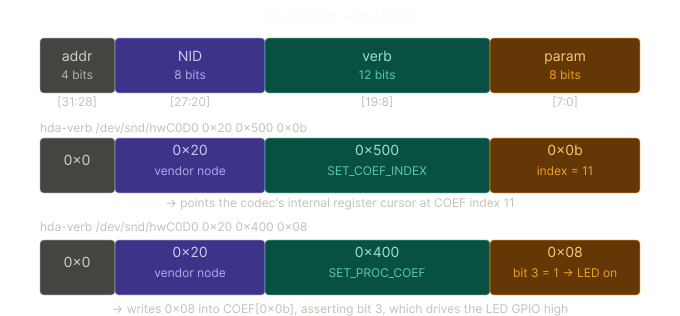
The raw HDA command sent for hda-verb /dev/snd/hwC0D0 0x20 0x500 0x0b is a single 32-bit word:
(codec_addr=0 << 28) | (nid=0x20 << 20) | (verb=0x500 << 8) | (param=0x0b)
= 0x0000_0000 | 0x0200_0000 | 0x0005_0000 | 0x0000_000b
= 0x0205_000b
And for the write: 0x02040008. These two 32-bit words go over the serial link one after the other, and the ALC245 interprets them as “set COEF cursor to index 11, then write 0x08 there.”
At this point I knew the hardware-level control path:
- Codec: Realtek ALC245
- Vendor node:
0x20 - COEF index:
0x0b - LED bit/value:
0x08 - Manual off value:
0x00 - Subsystem ID:
0x103c8a36
The remaining problem was not discovering the LED anymore. It was teaching the kernel that my specific laptop model should use the already-existing ALC245 mute LED fixup. Writing 0x00 to COEF index 0x0b turned the LED off in manual testing. The kernel’s fixup, as we’ll see, is more precise — it uses a bit mask and sets 0x04 as the ‘off’ pattern to avoid clobbering other bits in that register.
Step 4: Finding Where the Kernel Handles This
The Linux kernel’s HDA driver has two broad pieces involved here:
snd-hda-intel: the generic Intel HDA controller driversnd-hda-codec-realtek: the Realtek codec driver
The Intel controller driver knows how to talk over the HDA link, but it does not know every strange Realtek laptop-specific wiring detail. Those details live in the Realtek codec driver. To find the relevant files to update, I need to search for the codec definitions in the source code. For that I needed my coded and subsystem ID.
To find them, I used:
$ cat /proc/asound/card0/codec#0 | head -5
Codec: Realtek ALC245
Address: 0
AFG Function Id: 0x1 (unsol 1)
Vendor Id: 0x10ec0245
Subsystem Id: 0x103c8a36
Our Codec is ALC245, doing a search in the kernel for it returns:
rg "alc245"
src/linux-7.0.5/sound/hda/codecs/realtek/alc269.c
1392:static void alc245_fixup_hp_gpio_led(struct hda_codec *codec,
1448:static void alc245_fixup_hp_x360_amp(struct hda_codec *codec,
1566:static void alc245_fixup_hp_mute_led_coefbit(struct hda_codec *codec,
....
6659:           .v.func = alc245_fixup_hp_mute_led_coefbit,
7965:   {.id = ALC245_FIXUP_HP_X360_AMP, .name = "alc245-hp-x360-amp"},
7978:   {.id = ALC245_FIXUP_BASS_HP_DAC, .name = "alc245-fixup-bass-hp-dac"},
The filename looks confusing at first, because my codec is ALC245, not ALC269. But Realtek groups a bunch of related codecs under the ALC269-family driver, and ALC245 is handled there too.
That file contains the Realtek-specific fixups. A fixup is basically a small correction the kernel applies for a specific codec, laptop, or board. This is needed because the same Realtek ALC245 codec can be used in many laptops, and each manufacturer can wire LEDs, amplifiers, microphones, and speakers differently.
Then I searched inside alc269.c for existing ALC245 mute LED fixups for HP devices, with the ID 0x103c:
$ rg -nP "0x103c.*ALC245.*MUTE" src/linux-7.0.5/sound/hda/codecs/realtek/alc269.c
6919:   SND_PCI_QUIRK(0x103c, 0x8756, "HP ENVY Laptop 13-ba0xxx", ALC245_FIXUP_HP_X360_MUTE_LEDS),
6921:   SND_PCI_QUIRK(0x103c, 0x876e, "HP ENVY x360 Convertible 13-ay0xxx", ALC245_FIXUP_HP_X360_MUTE_LEDS),
6964:   SND_PCI_QUIRK(0x103c, 0x888a, "HP ENVY x360 Convertible 15-eu0xxx", ALC245_FIXUP_HP_X360_MUTE_LEDS),
6969:   SND_PCI_QUIRK(0x103c, 0x88b3, "HP ENVY x360 Convertible 15-es0xxx", ALC245_FIXUP_HP_ENVY_X360_MUTE_LED),
6971:   SND_PCI_QUIRK(0x103c, 0x88d1, "HP Pavilion 15-eh1xxx (mainboard 88D1)", ALC245_FIXUP_HP_MUTE_LED_V1_COEFBIT),
6973:   SND_PCI_QUIRK(0x103c, 0x88eb, "HP Victus 16-e0xxx", ALC245_FIXUP_HP_MUTE_LED_V2_COEFBIT),
7009:   SND_PCI_QUIRK(0x103c, 0x8a25, "HP Victus 16-d1xxx (MB 8A25)", ALC245_FIXUP_HP_MUTE_LED_COEFBIT),
7010:   SND_PCI_QUIRK(0x103c, 0x8a26, "HP Victus 16-d1xxx (MB 8A26)", ALC245_FIXUP_HP_MUTE_LED_COEFBIT),
7020:   SND_PCI_QUIRK(0x103c, 0x8a34, "HP Pavilion x360 2-in-1 Laptop 14-ek0xxx", ALC245_FIXUP_HP_MUTE_LED_COEFBIT),
7021:   SND_PCI_QUIRK(0x103c, 0x8a36, "HP Pavilion Plus 14-eh0xxx", ALC245_FIXUP_HP_MUTE_LED_COEFBIT),
7022:   SND_PCI_QUIRK(0x103c, 0x8a3d, "HP Victus 15-fb0xxx (MB 8A3D)", ALC245_FIXUP_HP_MUTE_LED_V2_COEFBIT),
7023:   SND_PCI_QUIRK(0x103c, 0x8a4f, "HP Victus 15-fa0xxx (MB 8A4F)", ALC245_FIXUP_HP_MUTE_LED_COEFBIT),
7072:   SND_PCI_QUIRK(0x103c, 0x8bbe, "HP Victus 16-r0xxx (MB 8BBE)", ALC245_FIXUP_HP_MUTE_LED_COEFBIT),
7073:   SND_PCI_QUIRK(0x103c, 0x8bc8, "HP Victus 15-fa1xxx", ALC245_FIXUP_HP_MUTE_LED_COEFBIT),
7074:   SND_PCI_QUIRK(0x103c, 0x8bcd, "HP Omen 16-xd0xxx", ALC245_FIXUP_HP_MUTE_LED_V1_COEFBIT),
7075:   SND_PCI_QUIRK(0x103c, 0x8bd4, "HP Victus 16-s0xxx (MB 8BD4)", ALC245_FIXUP_HP_MUTE_LED_COEFBIT),
7093:   SND_PCI_QUIRK(0x103c, 0x8c21, "HP Pavilion Plus Laptop 14-ey0XXX", ALC245_FIXUP_HP_X360_MUTE_LEDS),
7094:   SND_PCI_QUIRK(0x103c, 0x8c2d, "HP Victus 15-fa1xxx (MB 8C2D)", ALC245_FIXUP_HP_MUTE_LED_COEFBIT),
7095:   SND_PCI_QUIRK(0x103c, 0x8c30, "HP Victus 15-fb1xxx", ALC245_FIXUP_HP_MUTE_LED_COEFBIT),
7131:   SND_PCI_QUIRK(0x103c, 0x8c99, "HP Victus 16-r1xxx (MB 8C99)", ALC245_FIXUP_HP_MUTE_LED_COEFBIT),
7132:   SND_PCI_QUIRK(0x103c, 0x8c9c, "HP Victus 16-s1xxx (MB 8C9C)", ALC245_FIXUP_HP_MUTE_LED_COEFBIT),
7138:   SND_PCI_QUIRK(0x103c, 0x8cbd, "HP Pavilion Aero Laptop 13-bg0xxx", ALC245_FIXUP_HP_X360_MUTE_LEDS),
7145:   SND_PCI_QUIRK(0x103c, 0x8d07, "HP Victus 15-fb2xxx (MB 8D07)", ALC245_FIXUP_HP_MUTE_LED_COEFBIT),
7157:   SND_PCI_QUIRK(0x103c, 0x8dcd, "HP Victus 15-fa2xxx", ALC245_FIXUP_HP_MUTE_LED_COEFBIT),
7200:   SND_PCI_QUIRK(0x103c, 0x8e60, "HP OmniBook 7 Laptop 16-bh0xxx", ALC245_FIXUP_CS35L41_I2C_2_MUTE_LED),
7203:   SND_PCI_QUIRK(0x103c, 0x8e8a, "HP NexusX", ALC245_FIXUP_HP_TAS2781_I2C_MUTE_LED),
7215:   SND_PCI_QUIRK(0x103c, 0x8ed5, "HP EliteBook 8 Flip G2i 13", ALC245_FIXUP_HP_TAS2781_SPI_MUTE_LED),
7216:   SND_PCI_QUIRK(0x103c, 0x8ed6, "HP EliteBook 8 G2i 13", ALC245_FIXUP_HP_TAS2781_SPI_MUTE_LED),
7217:   SND_PCI_QUIRK(0x103c, 0x8ed7, "HP EliteBook 8 G2i 14", ALC245_FIXUP_HP_TAS2781_SPI_MUTE_LED),
7218:   SND_PCI_QUIRK(0x103c, 0x8ed8, "HP EliteBook 8 G2i 16", ALC245_FIXUP_HP_TAS2781_SPI_MUTE_LED),
7219:   SND_PCI_QUIRK(0x103c, 0x8ed9, "HP ZBook Firefly 14W", ALC245_FIXUP_HP_TAS2781_SPI_MUTE_LED),
7220:   SND_PCI_QUIRK(0x103c, 0x8eda, "HP ZBook Firefly 16W", ALC245_FIXUP_HP_TAS2781_SPI_MUTE_LED),
7226:   SND_PCI_QUIRK(0x103c, 0x8f40, "HP ZBook 8 G2a 14", ALC245_FIXUP_HP_TAS2781_I2C_MUTE_LED),
7227:   SND_PCI_QUIRK(0x103c, 0x8f41, "HP ZBook 8 G2a 16", ALC245_FIXUP_HP_TAS2781_I2C_MUTE_LED),
7228:   SND_PCI_QUIRK(0x103c, 0x8f42, "HP ZBook 8 G2a 14W", ALC245_FIXUP_HP_TAS2781_I2C_MUTE_LED),
7230:   SND_PCI_QUIRK(0x103c, 0x8f62, "HP ZBook 8 G2a 16W", ALC245_FIXUP_HP_TAS2781_I2C_MUTE_LED),
Which gave me a few potential functions to check for an already existing fixup function, or a very similar one, which can be copied for my specific device. I checked the ALC245_FIXUP_HP_MUTE_LED_COEFBIT, ALC245_FIXUP_HP_MUTE_LED_V1_COEFBIT, ALC245_FIXUP_HP_MUTE_LED_V2_COEFBIT.
Exploring the ALC245_FIXUP_HP_MUTE_LED_COEFBIT:
static void alc245_fixup_hp_mute_led_coefbit(struct hda_codec *codec,
       const struct hda_fixup *fix,
       int action)
{
 struct alc_spec *spec = codec->spec;

 if (action == HDA_FIXUP_ACT_PRE_PROBE) {
  spec->mute_led_polarity = 0;
  spec->mute_led_coef.idx = 0x0b;
  spec->mute_led_coef.mask = 3 << 2;
  spec->mute_led_coef.on = 2 << 2;
  spec->mute_led_coef.off = 1 << 2;
  snd_hda_gen_add_mute_led_cdev(codec, coef_mute_led_set);
 }
}
And I can already see that this function might be the exact fix we need:
spec->mute_led_coef.idx = 0x0bis the same COEF bits I found using brute force.spec->mute_led_coef.on = 2 << 2which is same as0x08- also confirmed via brute force.spec->mute_led_polarity = 0Polarity 0 means: LED turns on when muted, and off when unmuted. which matches: “Muted → orange light.” If polarity were 1, the logic would be inverted (LED on = unmuted).
What we learned new from this function
spec->mute_led_coef.mask = 3 << 2=0x0CThis is something the brute force couldn’t tell us. The mask 0x0C covers bits 2 and 3 together:bit: 7 6 5 4 3 2 1 0 0 0 0 0 1 1 0 0 ← 0x0C ^ ^ bit3 bit2This tells the kernel: “the LED is a two-bit field, not a one-bit toggle.” The kernel never writes a raw value — it always does a read-modify-write, touching only the masked bits:
spec->mute_led_coef.off = 1 << 2=0x04
This reveals something the brute force actually got wrong. I recorded the off value as0x00, because writing zero cleared the LED. But the correct off state is0x04(bit 2 set, bit 3 clear):on state → bit3=1, bit2=0 → 0x08 off state → bit3=0, bit2=1 → 0x04This is a two-state field where neither state is “both bits zero.” Writing 0x00 happened to turn the LED off visually, but it was putting the register into an undefined third state that Realtek’s internal logic interprets as off. The real off state keeps bit 2 asserted. This also explains why the mask is 0x0C and not just 0x08 — the off state actively sets bit 2, so both bits need to be under the kernel’s control.
This showed that the kernel already had a function named alc245_fixup_hp_mute_led_coefbit, and it already had the logic on how to control the mute LED using the same COEF mechanism I discovered manually. I confirmed it was the non-V2/V1 variant by checking that the COEF index and bit pattern in alc245_fixup_hp_mute_led_coefbit matched what I found — index 0x0b, bit 0x08.
So the kernel did not need a brand new driver. It only needed one more entry saying: “this HP laptop also uses that existing fixup.”
How SND_PCI_QUIRK and the quirk table work
SND_PCI_QUIRK is a macro used to add an entry to a quirk table. In simplified form, that entry stores four things:
{
    .subvendor = 0x103c,  /* PCI subsystem vendor ID */
    .subdevice = 0x8a36,  /* PCI subsystem device ID */
    .name = "HP Pavilion Plus 14-eh0xxx",
    .value = ALC245_FIXUP_HP_MUTE_LED_COEFBIT,
};
So the patch line:
SND_PCI_QUIRK(0x103c, 0x8a36, "HP Pavilion Plus 14-eh0xxx", ALC245_FIXUP_HP_MUTE_LED_COEFBIT),
Conceptually, this says: if the PCI subsystem vendor is 0x103c and the subsystem device is 0x8a36, use the fixup named ALC245_FIXUP_HP_MUTE_LED_COEFBIT.
The pci->subsystem_vendor and pci->subsystem_device fields come from PCI configuration space. These are the values HP programmed for this laptop’s audio device. That’s where 0x103c:0x8a36 comes from. The HDA fixup code scans the quirk table for a matching pair, and the value field tells it which fixup function to apply.
Step 5: The Actual Patch
The patch was just one line:
SND_PCI_QUIRK(0x103c, 0x8a36, "HP Pavilion Plus 14-eh0xxx", ALC245_FIXUP_HP_MUTE_LED_COEFBIT),
This line goes into the Realtek ALC269-family quirk table in sound/hda/codecs/realtek/alc269.c, sorted among the other HP subsystem IDs.
Breaking it down:
0x103c: HP’s PCI subsystem vendor ID0x8a36: my laptop’s subsystem device ID"HP Pavilion Plus 14-eh0xxx": a human-readable model nameALC245_FIXUP_HP_MUTE_LED_COEFBIT: the existing kernel fixup that knows how to control this mute LED
The macro expands into a small table entry. During boot, the HDA driver checks the subsystem ID of the audio device. If it sees 0x103c:0x8a36, it now selects ALC245_FIXUP_HP_MUTE_LED_COEFBIT.
That fixup tells the Realtek driver:
- use vendor node
0x20 - use COEF index
0x0b - use the LED bit pattern handled by the existing ALC245 fixup
- register the LED as an HDA mute LED
- connect it to the kernel’s audio mute trigger
One small detail: my manual testing showed that writing 0x08 turned the LED on and 0x00 turned it off. The existing kernel fixup is a little more careful. It uses a mask around the LED-related bits and writes the known on/off patterns for that codec. The important part is that the on pattern includes the 0x08 bit I found by brute force.
So before the patch, the kernel could mute and unmute audio, but it did not know that this laptop had a mute LED connected through that Realtek COEF bit.
After the patch, the kernel recognizes the laptop, registers the proper LED device under /sys/class/leds/, and automatically updates the LED when the mute state changes.
Step 6: Testing the Result
To recompile the kernel and test my change, I followed this guide: Patching the Arch Linux Kernel
After rebuilding and booting into the patched kernel, I checked whether the LED appeared:
$ ls /sys/class/leds/ | grep -i mute
hda::mute
Then I toggled mute:
pactl set-sink-mute @DEFAULT_SINK@ toggle
And finally, the tiny orange LED on F5 did exactly what it was supposed to do.
The fixup chain: from boot to a working LED
Here’s the sequence that happens every time the kernel loads the driver:
The HDA core enumerates the codec, reads Vendor ID
0x10ec0245, and binds it to the Realtek ALC269-family codec driver.The Realtek driver identifies this codec as an ALC245 and checks the
alc269_fixup_tbl[]quirk table using the PCI subsystem IDs.The lookup matches
0x103c:0x8a36and selects the entry with valueALC245_FIXUP_HP_MUTE_LED_COEFBIT.The fixup system calls the associated function
alc245_fixup_hp_mute_led_coefbit()at actionHDA_FIXUP_ACT_PRE_PROBE(defined in the function sample mentioned earlier).snd_hda_gen_add_mute_led_cdev()callsdevm_led_classdev_register(), which creates/sys/class/leds/hda::muteand attaches theaudio-mutetrigger to it. Thecoef_mute_led_setfunction pointer is stored as the LED’sbrightness_setcallback.From this point on: when PipeWire or any audio stack toggles the mute state, the HDA core updates its internal mute flag and notifies the
audio-mutetrigger. The trigger callsbrightness_set→coef_mute_led_set, which updates the same COEF register I discovered by hand:
SET_COEF_INDEX(0x0b) then SET_PROC_COEF(with the masked LED on/off pattern)
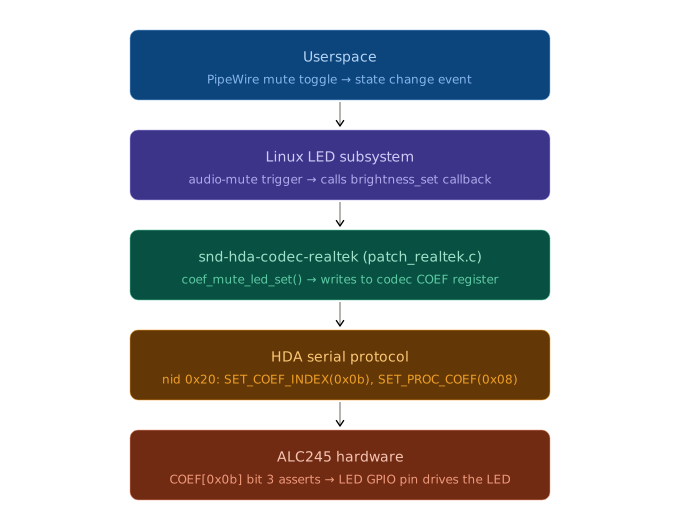
No background script. No polling. No manually writing hda-verb values. The kernel now owns it properly.
Wrapping it up
The whole fix, in short, looked like this:
- Confirm the visible problem: the F5 mute key worked, but the orange mute LED never changed state.
- Check
/sys/class/leds/and confirm that the kernel had not registered anhda::muteLED. - Identify the audio hardware using
lspciand/proc/asound/card0/codec#0. - Use
hda-verbto brute force GPIO and COEF values until the LED turned on. - Discover that Realtek ALC245 controls the LED through vendor node
0x20, COEF index0x0b, and the0x08bit. - Find that the kernel already had an ALC245 mute LED fixup for this COEF-based LED.
- Add one
SND_PCI_QUIRKentry for my HP subsystem ID,0x103c:0x8a36, insound/hda/codecs/realtek/alc269.c. - Rebuild and test the patched kernel.
- Confirm that
/sys/class/leds/hda::muteappeared and that the LED now followed the mute state automatically.
So the actual patch was tiny, but the work was in proving which hardware path controlled the LED. The kernel already knew how to drive this kind of ALC245 mute LED. It just did not know that my exact HP laptop should use that path.
The kernel now owns this entirely. No background daemon, no polling loop, and no user-space script trying to keep up with mute events.
Kernel Contribution?
So now that I have fixed the issue for my machine specifically, it would not be fair to keep it to myself. I wanted to share the patch with everyone so that anyone running Linux on similar setups as me, will have a working mute LED as well. Hence it’s time to make a kernel contribution and share the fix with the community.
To make a change in the Linux Kernel, you cannot simply create a PR on GitHub, you have to email the patch to the respective maintainer, and they will merge the changes upstream, and if all goes well, your changes will be present in the next release of the Linux Kernel.
Writing the patch file
Following the guide I used to patch the Arch Linux kernel, I learned how to generate a patch from my changes.
diff '--color=auto' -ruN a/sound/hda/codecs/realtek/alc269.c b/sound/hda/codecs/realtek/alc269.c
--- a/sound/hda/codecs/realtek/alc269.c 2026-04-30 14:43:05.000000000 +0530
+++ b/sound/hda/codecs/realtek/alc269.c 2026-05-10 11:19:44.203186515 +0530
@@ -7018,6 +7018,7 @@
  SND_PCI_QUIRK(0x103c, 0x8a30, "HP Envy 17", ALC287_FIXUP_CS35L41_I2C_2),
  SND_PCI_QUIRK(0x103c, 0x8a31, "HP Envy 15", ALC287_FIXUP_CS35L41_I2C_2),
  SND_PCI_QUIRK(0x103c, 0x8a34, "HP Pavilion x360 2-in-1 Laptop 14-ek0xxx", ALC245_FIXUP_HP_MUTE_LED_COEFBIT),
+ SND_PCI_QUIRK(0x103c, 0x8a36, "HP Pavilion Plus 14-eh0xxx", ALC245_FIXUP_HP_MUTE_LED_COEFBIT),
  SND_PCI_QUIRK(0x103c, 0x8a3d, "HP Victus 15-fb0xxx (MB 8A3D)", ALC245_FIXUP_HP_MUTE_LED_V2_COEFBIT),
  SND_PCI_QUIRK(0x103c, 0x8a4f, "HP Victus 15-fa0xxx (MB 8A4F)", ALC245_FIXUP_HP_MUTE_LED_COEFBIT),
  SND_PCI_QUIRK(0x103c, 0x8a6e, "HP EDNA 360", ALC287_FIXUP_CS35L41_I2C_4),
Submitting the patch file
Now you have to send the patch to the respective maintainer. To find the maintainer who is responsible for the files you have changed, the kernel includes a handy script in the source code itself.
$ ./scripts/get_maintainer.pl -f sound/hda/codecs/realtek/alc269.c
Jaroslav Kysela <perex@perex.cz> (maintainer:SOUND)
Takashi Iwai <tiwai@suse.com> (maintainer:SOUND)
linux-sound@vger.kernel.org (open list:SOUND)
linux-kernel@vger.kernel.org (open list)
Now I have the people to send the patch to, but the patch above is missing some information, most importantly, it’s missing who sent it and when. So after some formatting, here is the final patch file.
From: Aryan Kushwaha <aryankushwaha3101@gmail.com>
Date: Sun, 10 Apr 2026 15:36:22 +0530
Subject: [PATCH] ALSA: hda/realtek: Add mute LED quirk for HP Pavilion Plus 14

The HP Pavilion Plus 14-eh0xxx with subsystem ID 103c:8a36 needs the
ALC245 COEF bit mute LED quirk for the mute LED to follow the audio mute
state.

Add the missing quirk entry.

Signed-off-by: Aryan Kushwaha <aryankushwaha3101@gmail.com>
---
 sound/hda/codecs/realtek/alc269.c | 1 +
 1 file changed, 1 insertion(+)

diff --git a/sound/hda/codecs/realtek/alc269.c b/sound/hda/codecs/realtek/alc269.c
--- a/sound/hda/codecs/realtek/alc269.c
+++ b/sound/hda/codecs/realtek/alc269.c
@@ -7018,6 +7018,7 @@
  SND_PCI_QUIRK(0x103c, 0x8a30, "HP Envy 17", ALC287_FIXUP_CS35L41_I2C_2),
  SND_PCI_QUIRK(0x103c, 0x8a31, "HP Envy 15", ALC287_FIXUP_CS35L41_I2C_2),
  SND_PCI_QUIRK(0x103c, 0x8a34, "HP Pavilion x360 2-in-1 Laptop 14-ek0xxx", ALC245_FIXUP_HP_MUTE_LED_COEFBIT),
+ SND_PCI_QUIRK(0x103c, 0x8a36, "HP Pavilion Plus 14-eh0xxx", ALC245_FIXUP_HP_MUTE_LED_COEFBIT),
  SND_PCI_QUIRK(0x103c, 0x8a3d, "HP Victus 15-fb0xxx (MB 8A3D)", ALC245_FIXUP_HP_MUTE_LED_V2_COEFBIT),
  SND_PCI_QUIRK(0x103c, 0x8a4f, "HP Victus 15-fa0xxx (MB 8A4F)", ALC245_FIXUP_HP_MUTE_LED_COEFBIT),
  SND_PCI_QUIRK(0x103c, 0x8a6e, "HP EDNA 360", ALC287_FIXUP_CS35L41_I2C_4),
--
2.54.0
At the time of writing this blog, the patch has not been merged yet, I’ll update this post once I hear back from the maintainers.
Update #1:
The patch has been merged into mainline Linux Kernel on Sat, 16 May 2026
View it on Kernel Lore